
How to manage IP renewals with an AI assistant


- The PatentRenewal.com MCP server connects your existing IP renewal portfolio to Claude, ChatGPT, Codex and other MCP-compatible assistants, without a custom software integration.
- You can ask for live renewal deadlines, fee breakdowns, payment statuses and instruction history. With Edit rights, you can also give renewal instructions and update case records.
- Connecting is free, if you don't have a PatentRenewal.com account yet, you can sign up for free. Then add the server address to Claude, ChatGPT or another compatible assistant and sign in securely. Availability depends on the AI tool and its workspace permissions.
- The connection follows your existing PatentRenewal.com access rights. Whatever the assistant shows you in the chat is also processed by your AI provider, so check its data settings, for example whether chats are used for training.
A finance colleague asks what renewals will cost next quarter. An attorney needs to confirm an instruction. A portfolio manager wants a list of cases in surcharge. Each request can mean searching records, exporting data and rebuilding a report.
The PatentRenewal.com MCP server turns each of these into a question for your AI assistant. Once you connect Claude, ChatGPT or another compatible assistant to your IP renewal portfolio, it can look up upcoming renewals, break down costs and check payment statuses and instruction history. If you have “Edit” rights, it can also submit renewal instructions and update case records for you.
What can your AI assistant see and change with your IP renewals?
There are two levels of access. With “View” rights, the assistant can look things up: it answers questions about your cases, deadlines and costs, but cannot change anything. With “Edit” rights, it can also act for you: give renewal instructions, add cases and keep your account details up to date.
With View rights, the assistant can:
- Find any case: search by your own reference or by application, grant or publication number.
- Get an overview: list cases by company, client or cost center, for example everything one business unit maintains.
- Check what is due and what it costs: renewal deadlines, fee breakdowns, payment status and payment due dates.
- Look back at what happened: instruction history (what was instructed, by whom and when) and billing details.
With Edit rights, it can also:
- Give renewal instructions: renew, cancel, hold or mark cases as client-managed, for one case or many at once.
- Keep your portfolio complete: add newly granted cases and update case details.
- Organize your account: create or update owners, partners and cost centers.
- Manage clients and users: link customers to partners or create new users.
Good to know: the assistant only gets the access of the person who signs in, so connecting it never gives anyone broader permissions. Administrator rights work the same way as in the web platform. If you use a company Claude or ChatGPT workspace, your workspace admin can also limit which connectors and actions you can use.
Built-in safeguards:
- Every renewal instruction is recorded in PatentRenewal.com with a reason code.
- If an instruction cannot safely be applied automatically, it goes to the PatentRenewal.com team for review.
- When a change fails, the MCP server does not retry it on its own. It tells the assistant to check what happened first.
How does AI connect to your IP portfolio?
An AI assistant can access your PatentRenewal.com renewal information through a connection called the Model Context Protocol (MCP). MCP is an open standard that lets AI assistants use tools and information from external services.
The MCP server lets the assistant retrieve live case information rather than rely on a spreadsheet pasted into a chat. It can also submit supported instructions through the permission-controlled platform.
The connection covers patents, trademarks, designs and utility models. It works with Claude, ChatGPT, Codex, other MCP clients and models running on your own hardware. You are not locked into one AI provider. See the PatentRenewal.com MCP overview for the supported workflows.
A general chatbot does not know which rights you maintain, what your payments will cost or whether instructions were recorded. The MCP connection supplies that account-specific context within your permissions.
Where can AI help with IP renewals?
Here are seven tasks for corporate IP departments and IP law firms. The first three only read your data; the other four change it and need Edit rights.
1. Check deadlines, urgent cases and instruction history
See what is coming up, what is urgent and what has already been instructed.
Try asking:
- “Which renewals are due in the next 90 days, and what will they cost?”
- “Which cases are in surcharge right now?”
- “What was instructed in this case, and when?”
What you get: cases, deadlines and fees that you can narrow by company, country or cost center, plus the recorded instruction history (what was instructed, by whom and when). This helps when a colleague takes over a portfolio or an attorney needs to answer a client.
Tip: keep official renewal deadlines separate from internal payment due dates.
2. Explain renewal costs to finance and clients
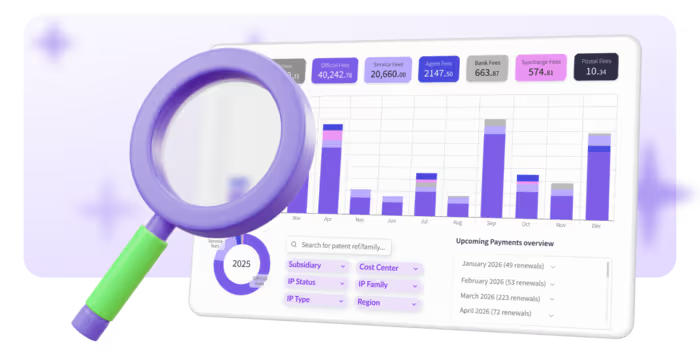
Finance needs more than one total: which countries or cost centers drive spending, and which charges are official fees rather than additional costs.
Try asking:
- “Break down upcoming renewal costs by country or cost center.”
- “Which clients have renewals due this quarter?” (for renewal coordinators at IP law firms)
- “Show this client's costs, payment due dates and case statuses.”
What you get: fee details that separate official fees, surcharges, agent fees and service fees where available, so you can explain the budget instead of sending one unexplained total. The assistant only retrieves records the signed-in user can access, so one client's portfolio is never visible to another client.
It supports your renewal cost reporting and budget forecasting without replacing your budget assumptions.
3. Prepare an IP portfolio review
Deciding which rights to keep is a business and legal judgment. AI can pull the financial information together before that discussion.
Try asking:
- “Which 10 cases cost the most to keep over the next five years, and what would we save by dropping them?”
- “Which countries account for most of our renewal costs over the next five years?”
What you get: the most expensive cases and their projected renewal costs. Your team can then weigh each right's product relevance, geographic coverage and strategic value before deciding what to do.
Cost alone is not a reason to let a right lapse. For a broader review framework, see our guide to patent portfolio management KPIs.
4. Give renewal instructions in bulk
With Edit rights, you can renew, cancel, hold or mark cases as client-managed from the conversation, for a single case or a whole family or product line.
Try asking:
- “Stop the renewals in these 12 countries for family X, keep the rest.”
- “Put all cases tagged with product number 122311 on hold.”
- “Renew everything in Europe and the US, and let the rest lapse.” (for example, after a portfolio review)
Good to know: ask the assistant to list the matching cases before it submits anything, and check that selection. The instructions are then recorded in PatentRenewal.com, just as if you had given them in the web platform.
5. Add new cases to your portfolio
Adding a newly granted patent is one of the most common updates law firms make, and you can add cases in bulk too.
Try asking:
- “This patent was just granted. Add it.”
- “Here is our spreadsheet of patents. Which ones are not in the platform? Add them.”
What you get: new cases are checked against the official registers before they are added.
Good to know: check the matched cases before you confirm, since a spreadsheet can contain outdated references or duplicates.
6. Update contacts and billing details
Keep reminders and invoices going to the right place when people or details change.
Try asking:
- “Send all renewal reminders that currently go to Anna to Ben instead.” (when a colleague leaves)
- “Change our invoice currency to USD.”
7. Set up a new client or business unit
Edit rights also cover account structure: owners, partners and cost centers. Law firms use this when they take on a new client, and corporate teams when a new business unit starts filing.
Try asking:
- “Create a new client company for Acme GmbH with two cost centers, Munich and Berlin, invoiced in EUR.”
How to connect your IP portfolio to AI
You can connect a compatible AI assistant without building a software integration. The overall process is the same across tools, although the menu names and availability depend on the provider and your account plan.
- Create a free PatentRenewal.com account, if you do not already have one.
- Add the MCP server address to your assistant:
https://mcp.patentrenewal.com/mcp. - Sign in through PatentRenewal.com when the assistant asks you to authorize the connection.
Connect Claude on the web or desktop
In Claude, open Customize > Connectors, choose Add custom connector, give it a name such as PatentRenewal.com, and enter https://mcp.patentrenewal.com/mcp. Review the authentication options, add the connector and complete the PatentRenewal.com sign-in when prompted.
For Team or Enterprise, an owner first adds it in Organization settings > Connectors. See Claude’s connector instructions.
Connect Claude Code
You can do it right in Claude, no Claude Code needed, as long as the MCP server is a remote one, meaning it has a URL. To add the server from the terminal instead, run:
claude mcp add --transport http patentrenewal https://mcp.patentrenewal.com/mcp
claude mcp login patentrenewal
Complete browser sign-in when prompted.
Connect ChatGPT
ChatGPT supports custom MCP servers on eligible Business and Enterprise/Edu workspaces on the web. Workspace permissions control creation, publication and actions.
- Open Plugins and select Add custom MCP server from the plus menu.
- Give the connection a recognizable name and enter
https://mcp.patentrenewal.com/mcpas the HTTPS endpoint. - Configure authentication and authorize access on PatentRenewal.com's sign-in page.
- Review the listed tools and permissions, accept the connection warning and create the plugin.
- Install or enable it in your workspace, then try a renewal question in a new conversation.
OpenAI's current custom MCP setup guidance covers workspace roles and action permissions.
Connect Codex CLI
Codex users can add and authorize the same server with:
codex mcp add patentrenewal --url https://mcp.patentrenewal.com/mcp
codex mcp login patentrenewal
For other MCP-compatible clients, use the PatentRenewal.com setup documentation.
How is your IP portfolio data protected?
The MCP server uses PatentRenewal.com's existing sign-in and permissions, but your AI provider also processes the portfolio information returned to the conversation. Both parts of the setup deserve attention.
Sign-in and access
- You sign in on PatentRenewal.com's own page through OAuth. You never enter your password into the AI assistant, and there is no API key to copy.
- The assistant receives an encrypted token that expires after 10 minutes and is renewed in the background.
- Sessions end after seven days of inactivity, and after 30 days at most.
Permissions and records
- Every request is checked against your View, Edit and Administrator rights by the same API the web platform uses.
- Separation between customer accounts is tested automatically every night.
- The MCP server is hosted in the EU and stores no portfolio data. It retrieves answers live.
- Instructions remain recorded in the platform.
The AI provider
- Once information appears in the AI conversation, your provider processes it under your organization's agreement with that provider.
- For sensitive portfolios, we recommend a business or enterprise plan with training on customer data turned off.
- To avoid sending portfolio information to an outside AI provider, use a compatible model running on your own hardware. The MCP connection still communicates with PatentRenewal.com.
One practical precaution: create new users directly in the PatentRenewal.com web platform, even though user creation is technically supported through the MCP. A password typed into a conversation would pass through the AI provider.
Frequently asked questions
Can the assistant decide which IP rights to drop?
No. The MCP server is a data connection: it supplies costs, deadlines and case data, and carries out the instructions you give it. It does not judge whether an IP right is worth keeping. Your AI assistant may still give its own opinion if you ask, and PatentRenewal.com has no control over that, so treat it as input to your team's decision, not a recommendation. For a wider view, see where AI is changing patent work.
Can we connect our docketing or IP management software instead?
Yes, through the PatentRenewal.com API. MCP is for people working in an AI assistant. The API is for developers who want renewal costs, deadlines and instructions to flow into your own docketing system, IP management software or internal tools, and it requires development work. See the PatentRenewal.com API documentation.
How do we disconnect the assistant?
Remove the PatentRenewal.com connector in your AI assistant's settings. Access also ends on its own: sessions end after seven days of inactivity and after 30 days at most, after which you sign in again.
Does the MCP connection cost anything?
PatentRenewal.com account sign-up and MCP access are free. Your AI assistant's subscription or workplace plan may have its own charges.
What if an answer looks wrong?
Check it against the underlying records in the IP Dashboard. The data comes live from PatentRenewal.com, but an AI assistant can still misread or misreport it. Multi-year projections are estimates, not final amounts, so label them that way when you share them.
Start with one renewal workflow
Start with a recurring question, such as next quarter’s renewal costs. Check the returned cases against your usual report before expanding into other tasks.
Then explore Edit actions with appropriate rights and review. Explore the PatentRenewal.com MCP server, connect your assistant or book a demo.